How to Schedule a Meta Post (Facebook, Instagram, Threads) with Socialic MCP
To schedule a Meta post with Socialic MCP, you ask Claude to post to Facebook, Instagram, and Threads in one request — it lists your connected channels, checks each platform’s media rules (Instagram needs at least one image or video, Threads accepts images only, Facebook is the most flexible of the three), asks for anything missing, and schedules all three together or on their own times.
Facebook, Instagram, and Threads get grouped together here because they usually are in practice — all three trace back to the same Facebook-based connection in Socialic, and people tend to post to them as a set. But “Meta” isn’t one platform with one rulebook. This guide covers what’s shared, what’s different, and how to hand Claude a single request that respects all three.
Why Facebook, Instagram, and Threads Are Grouped Here
In Socialic, an Instagram Business or Creator account and a Threads account both connect through a Facebook Page — see how to connect your social accounts to a scheduler for that setup. Once connected, each still shows up to Socialic MCP as its own separate channel with its own id, its own caption limit, and its own media rules. Grouping them in one request is a convenience, not a technical requirement — you could just as easily schedule each one separately.
Before You Start
Facebook, Instagram, and/or Threads already connected in Socialic. You don’t need all three — this works the same with just one or two connected.
Socialic MCP connected to Claude. As a Connector on claude.ai, or as an MCP server in Claude Code — see how to connect Socialic MCP if you haven’t yet.
Media ready, if you’re posting to Instagram. Instagram has no text-only post, so have an image or video ready — either a public https link, or something already sitting in your Socialic media library.
Step 1: Know Where the Three Platforms Differ
Before asking Claude to post, it helps to know which platform is strict about what. Socialic MCP enforces the same rules the dashboard does:
Instagram — media required. Images or video, up to 10 items. A single video is treated as a Reel automatically. No text-only posts.
Facebook Page — media optional. The most flexible of the three: text-only, images, or video, up to 10 items. A single video is Reel-eligible the same way as Instagram.
Threads — media optional, images only. Up to 10 images if you attach any, but no video at all. A caption with no media is fine.
This is also why “post this everywhere” doesn’t always mean the same request underneath. A video that works for Facebook and Instagram will get rejected the moment Threads is in the channel list — Claude catches this before submitting anything, not after.
Step 2: List Your Connected Channels
Start by asking Claude something like “list my Facebook, Instagram, and Threads channels” — or just whichever of the three you’ve actually connected. This calls socialic_list_channels, which returns each channel’s id, status, caption limit, and requirements — so Claude (and you) know exactly what each one needs before drafting anything.
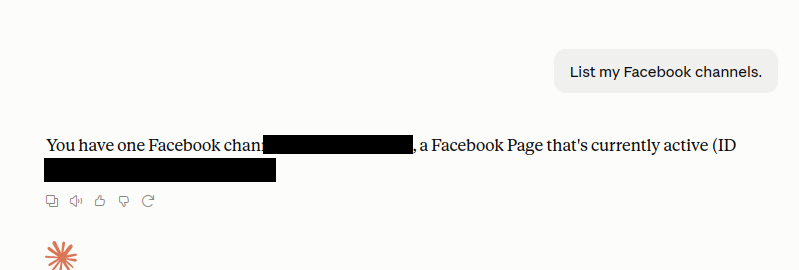
A single-channel example on claude.ai — the same request just returns more entries once Instagram and Threads are connected too.
The same request works the same way in Claude Code:
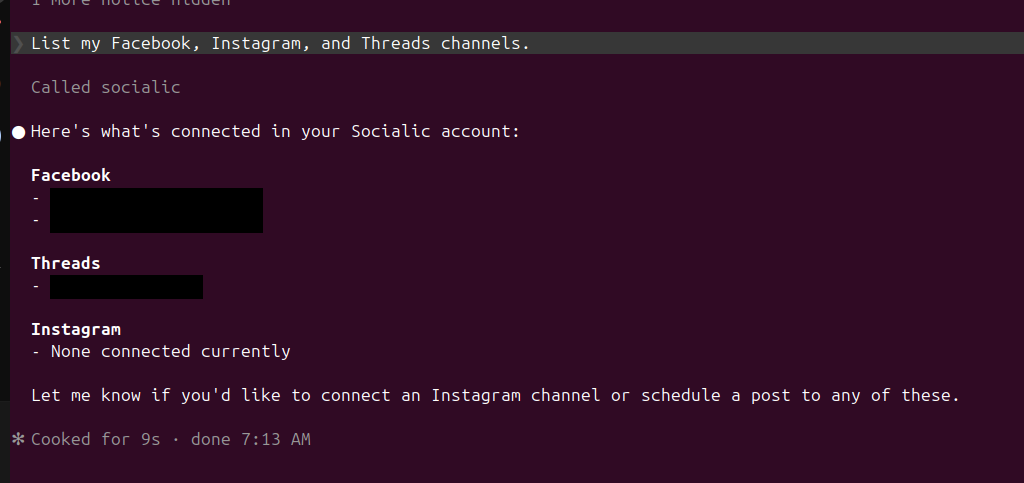
This account has Facebook and Threads connected but no Instagram yet — Claude reports what’s missing, not just what’s there.
Step 3: Ask for the Post, All Three at Once
If you already know the exact filename you want, you can name it directly in the same request that schedules the post — see the example below. If you don’t remember it, ask first: “what images do I already have in my Socialic media library?” This calls socialic_list_media_files and lists everything you’ve uploaded, so you can just tell Claude which one to use.
That “media library” is the same File Manager you’d see in the Socialic dashboard — drag-and-drop uploads, storage totals, the works. If you’ve never used it, here’s a quick rundown of uploading and organizing media; anything in there is fair game for Claude to reference by name, no re-upload needed.
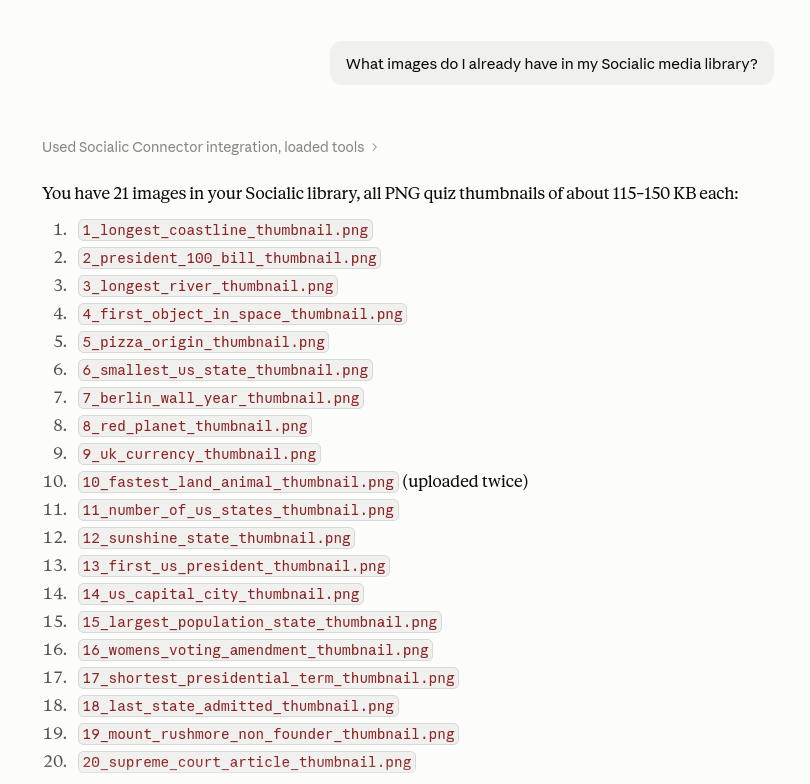
Socialic even flags accidental duplicate uploads — see item 10 above.
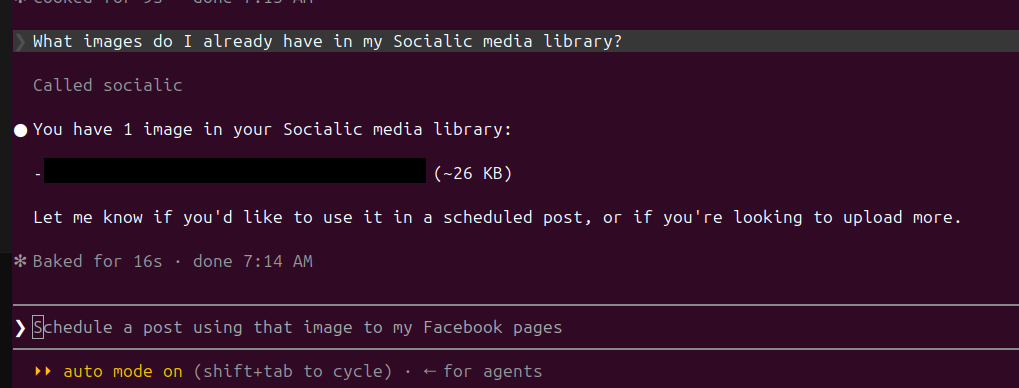
Same discovery step in Claude Code — and a natural lead-in to the next request, typed right below the answer.
A typical exchange looks like this:
- You: “Post this to Facebook, Instagram, and Threads tomorrow at 10am ET: ‘New product photos are up — link in bio.’ Use launch-photo.jpg from my media library.”
- Claude: “All three are connected and launch-photo.jpg works for all of them. Scheduling for Thu, 10:00 AM ET on Facebook, Instagram, and Threads…”
- Claude: “Scheduled on Facebook, Instagram & Threads.”
Because the media was a single image, all three rules were satisfied automatically — Instagram had its required media, Threads got an image instead of video, and Facebook accepted it without needing anything at all. Swap that image for a video and the exchange changes: Claude would flag that Threads can’t take it and ask whether to drop the video or drop Threads from this post.
Here’s a real one, scheduling to a single connected Facebook Page with an existing media library file instead of a fresh upload:
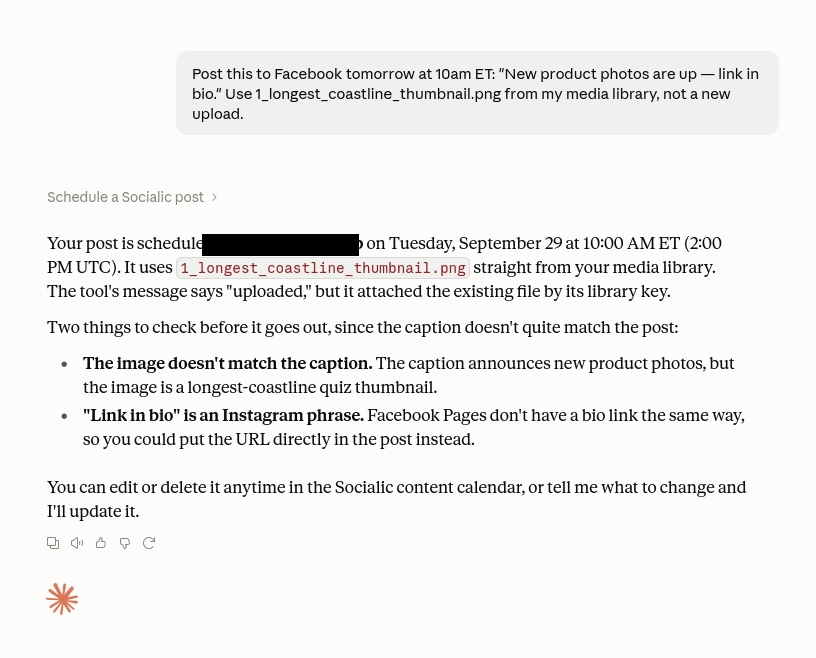
Claude confirmed, then reviewed the post before treating it as done.
Two things worth noticing in that exchange:
“Uploaded” doesn’t always mean a fresh upload. Claude called out that the underlying tool’s confirmation said “uploaded,” but what actually happened was the existing file being attached by its media library key — nothing left your library or hit the network twice.
Claude reviews the post, not just the platform rules. Socialic MCP only validates things like media count and caption length — it has no idea what’s actually in your photo. Claude caught that on its own here: the caption promised “new product photos” over a quiz thumbnail, and “link in bio” is Instagram phrasing that doesn’t mean anything on a Facebook Page. Neither check is enforced by the tool; it’s Claude reading the request back before calling it done, and it will only catch what you give it enough context to notice.
The Claude Code version of the same request, continuing straight from the media library lookup above:

Once it’s scheduled, extending it to another platform is just the next message — no need to repeat the whole request.
That follow-up — “post the same photo to Threads too” — is the same idea as scheduling to all three at once, just spread across two messages instead of one. Claude already has the image and the caption from context, so it only needs the new channel to act on. This is also how you’d handle the case from earlier in this guide, where a video works for Facebook and Instagram but not Threads: schedule the two that take video together, then send Threads its own message with a still image instead.
Step 4: Give Each Platform Its Own Caption
One caption for three platforms works, but tailoring it usually performs better — Facebook tolerates a longer caption, Instagram rewards hashtags, Threads favors something short and conversational. You can ask for this directly:
- You: “Same post, but give Instagram a version with hashtags and keep Threads to one short line.”
Under the hood this is socialic_schedule_post taking your base caption as a shared default, with a per-channel override for Instagram and Threads — the same mechanism that lets you set a different scheduled time per platform, if you’d rather stagger Facebook, Instagram, and Threads across the day instead of posting all three at once.
Common Issues
“Instagram requires media” when you meant to post text-only
This isn’t a bug — Instagram has no text-only post type. Attach at least one image or video, or drop Instagram from that request and post text-only to Facebook and Threads instead.A video post fails on Threads
Threads only accepts images. If you want a video out to all three, schedule Facebook and Instagram together with the video, and send Threads a separate post — a still frame, a linked clip, or just the caption with no media.Claude says a channel isn’t connected
Instagram and Threads publishing both require the account to be linked to a Facebook Page first — a platform requirement, not a Socialic one. If a channel is missing, check how to connect your social accounts to a scheduler, then ask Claude to list channels again.More than 10 images attached
All three platforms cap out at 10 images per post through Socialic MCP. Trim the set, or split it into more than one post.Frequently Asked Questions
Why are Facebook, Instagram, and Threads grouped together?
All three are Meta platforms and, in Socialic, are typically connected through the same Facebook-based authorization flow — an Instagram Business account and a Threads account both link back to a Facebook Page. Grouping them together in one request is usually how people actually use them.Does Instagram really require media on every post?
Yes. Instagram has no text-only post type, so socialic_schedule_post requires at least one image or video for any Instagram channel. If you ask to schedule an Instagram post with no media, Claude will ask you for one before continuing.Can I post a video to Threads?
No. Threads only accepts images through Socialic MCP — up to 10 per post, no video. If you include a video and select Threads as one of the channels, Claude will flag it and ask you to drop the video or drop Threads from that post.Do I have to write the same caption for all three platforms?
No. Socialic MCP takes a shared caption as the default and lets you override it per channel, so you can give Facebook a longer caption, Instagram a hashtag-heavy one, and Threads a short one-liner, all from the same request.What counts as a Reel versus a regular video post on Facebook and Instagram?
A Reel is just a single video attached to the post — Socialic MCP treats one video as a Reel-eligible post on both Facebook and Instagram automatically. You don’t set a separate “Reel” flag; you just attach one video and nothing else.Can I schedule to Facebook, Instagram, and Threads for different times?
Yes. Each channel in the request can carry its own scheduled time, so you can post to Instagram in the morning and stagger Facebook and Threads later the same day, all in one conversation.Why does Claude say a file was “uploaded” when I asked it to reuse an existing one?
That wording comes from the underlying tool’s confirmation message and can be misleading — when you reference a file already in your Socialic media library, it’s attached by its library key, not re-uploaded from scratch. Nothing leaves your library twice; only genuinely new files go through a fresh upload.Final Thought
“Meta” is a convenient shorthand, not a single set of rules. Facebook is the forgiving one, Instagram is the strictest about media, and Threads is the odd one out with images-only. Socialic MCP already knows all three rulebooks — the only thing you need to bring is media that satisfies whichever platforms you’re posting to.
Don’t have a Socialic account yet? Start free
and connect your first Meta channel.
Keep Reading
New to Socialic MCP? What is Socialic MCP? and how to connect it to Claude cover the setup this guide assumes.
Want the full picture beyond scheduling? every capability, with sample prompts and responses covers listing, editing, and deleting posts too — not just the schedule step this guide focuses on.
Posting beyond Meta through MCP? Scheduling YouTube, TikTok, Pinterest, and LinkedIn posts covers the required category, privacy level, and board fields those four add. Prefer the dashboard for every platform at once? See how to schedule posts to every platform at once, or make sure your accounts are connected correctly first with how to connect your social accounts to a scheduler.